UCAT Navigator: What It Is and How to Use It
Posted: June 22, 2023 by Chris
The UCAT Navigator is a tool on the official UCAT test screen that lists every question in your current subtest with its status (Unseen, Incomplete or Complete) and shows which are flagged for review. You can open it with the Navigator button or Alt + V, then jump straight to any question. It was introduced in 2023 and is still part of the test. This blog explains how to open it, how it works and when to use it.
How can I access the UCAT Navigator?
You can open the UCAT Navigator by clicking ‘Navigator’ on the blue toolbar at the bottom right of the UCAT testing screen, or by using the keyboard shortcut Alt + V. Once you reach the review screen at the end of the UCAT subtest, the Navigator is no longer available.
How does the UCAT Navigator work?
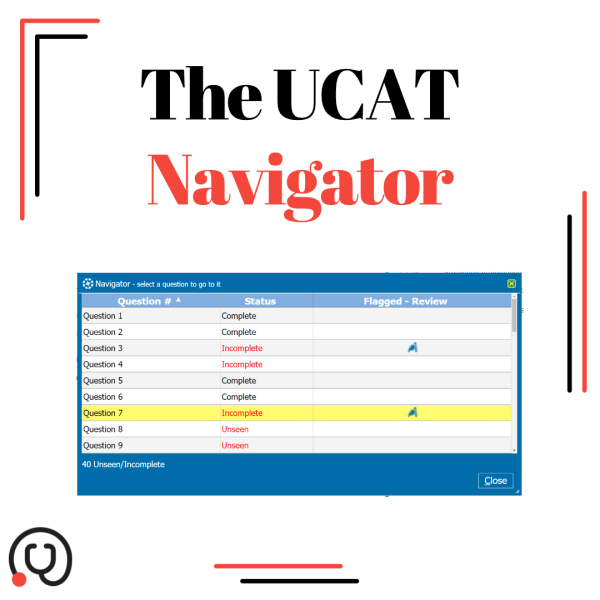
Here is an example of what the Navigator window looks like:

To navigate to a particular question in the UCAT subtest, you can click on the question number.
If a question has been flagged for review, a blue flag will show up in the ‘Flagged – Review’ column.
At the bottom left of the Navigator window there is a counter showing the number of questions in that subtest that are marked as ‘Unseen’ or ‘Incomplete’.
To close the Navigator window, click the X button in the top right of the window or the Close button (Alt + C). You must close the Navigator before you can take any other actions in the test.
You can sort the columns in the Navigator window in different ways by clicking on a column’s header bar (indicated by the light blue background):
- Click the ‘Question #’ header bar to reverse the order of questions. Click it once more to return to numerical order.
- Click the ‘Status’ header bar to order the questions by ‘Unseen’ > ‘Incomplete’ > ‘Complete’.
Click it again to reverse this order
Click the ‘Question #’ header bar to again re-sort the list by numerical order.
- Click the ‘Flagged – Review’ header bar to sort questions that are flagged for review first. Click the ‘Question #’ header bar to re-sort the list by numerical order.
Note: closing the Navigator window reverts sorting to default, so UCAT questions will be presented in numerical order.
When should I use the UCAT Navigator?
UCAT candidates should be cautious when using the Navigator, as it can waste time or cause confusion. There is little to no point in using it early on in a subtest when there are still many UCAT questions left to be answered.
The Navigator is best used during the UCAT subtests (before the UCAT review screen) to help keep track of how many and which questions have been skipped (‘Incomplete’) or flagged. It also allows you to go straight to these questions by clicking on the question number, either to finish them off or to review questions you have flagged.
Used correctly, the Navigator can allow test takers to shave off valuable seconds in the highly time-pressured UCAT exam.
The Navigator is included in the MedEntry Online Learning Platform, so you can practise using it right away!


